Please Share

Wednesday, December 24, 2025

I Want My Quarters Back

 🎄 A Christmas Gift for the Kids of the ’80s 🎮

Over the past few months, I’ve been quietly building something that taps straight into my childhood: a web‑based arcade featuring my own modern takes on some of the games that defined the 1980s.

Today, I’m excited to share it: https://iwmqb.com/

What started as a fun creative break quickly turned into a full-on passion project. Pixel art, retro sound cues, tight controls, and that unmistakable arcade feel—reimagined with today’s tech.

So this Christmas, I’m offering it as a little gift to all the kids of the ’80s (and anyone who still feels like one).

If you grew up feeding quarters into arcade cabinets or discovering classics on early consoles, I hope this brings back a spark of that magic.

🕹️ Play. Nostalgize. Compete. Repeat.  

And if you check it out, I’d love to hear which game hits your nostalgia nerve the hardest.

Here’s to creativity, playfulness, and keeping the retro spirit alive.  

Merry Christmas!

Thursday, December 23, 2021

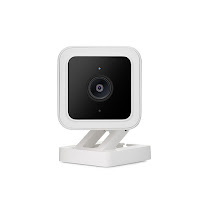
My Tech Recommendation for 2022 - Wyze Cam v3

It's a little close to Christmas to make this a gift suggestion, though if you're lucky your local Home Depot may have one in stock, but if you are looking for a cost effective solution to home monitoring / security then the Wyze Cam v3 is tough to beat.

This little 2.4 GHz Wi-Fi enabled indoor / outdoor camera sells for just $33 US or $44 Canadian and has a terrific set of features:

  • Starlight CMOS Sensor for ultra low-light conditions
  • IP65-rated weatherproof with "extreme" temperature tolerance from -4°F to 113°F (-20°C to 45°C)
  • Local Storage (microSD card required) or store in the Cloud (limited to 14 second clips unless subscribed to Cam Plus)
  • 1920x1080p Full HD
  • 20 frames per second (fps) day time and 15 fps night time
  • 3 mounting options
  • Simultaneous 2-way communication via the Wyze app and camera speaker / microphone
  • Speaker can emit mini siren when triggered by the Wyze app
  • Near-IR and Far-IR lights for indoor and outdoor night vision

Wyze Cam v3

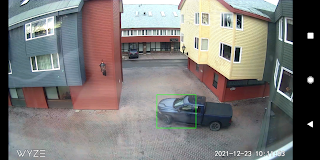
The object recognition is quite good with the Wyze Cam v3 and Wyze app, they're able to send alerts when recognizing simple motion or sounds (you set the threshold) but also can distinguish between vehicles, persons, pets, and packages and send specific alerts for each.


Wyze app vehicle detection

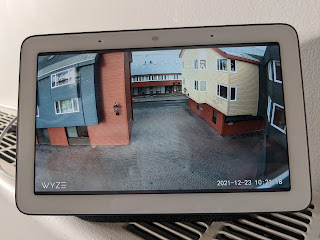
I have a Google Nest Hub and Wyze has made it simple to connect to that device, a single "Stream living room camera" command and the two work great together to act as a real time monitoring solution. You can also monitor through the Wyze app on your Android 5.0+ or iOS 9.0+ mobile device.


Google Nest Hub streaming camera video

If there is a knock on the Wyze Cam v3 it's fairly minor, in my case, but there are no battery options. It's USB powered via an included 6' micro USB cable / AC block which means you are limited to where you can place it based on proximity to an AC outlet and you'll have to provide your own backup power solution incase of power disruption. Of course your internet connection will also have to have a backup option or you'll need a microSD to save locally, but alerts will be affected without internet connectivity.


Wednesday, May 6, 2020


Snowbirds Fly By 05/06/2020
Operation Inspiration

Thursday, July 25, 2019

Apollo 11 Guidance Computer Restored

Being that we are all celebrating the Apollo 11 mission to the moon, I found this to be one of the more interesting things happening from a geek's perspective. Head on over to the YouTube channel "CuriousMarc" where he's gotten his hands on and restored the Apollo 11 Guidance Computer!


Also, if you've not already done so... check out the website "Apollo 11 in Real-time" where you can experience the mission as if it were happening at this moment.

Monday, July 22, 2019

Minelab continues to tease new metal detector

Back in May Minelab teased a new metal detector named Vanquish. While nothing but the video was released, and much has been speculated, we still know nothing about the new machine specs, price or availability.

Last week another video surfaced, this one longer but still a teaser, that again seems to be taking aim at Garrett another big company in the space.

Why the US refuses to go metric

The Verge provides us with 3 reasons why the United States has been a hold out regarding the adoption of the metric system.


Having experienced the transition to metric by Canada in the 1970's I can tell you it's not that scary, but I'll be honest I still convert in my head. I have also never referred to my height in meters or my weight in kilograms.

Friday, July 19, 2019

Windows 10 Emoji Picker

Here's a pro tip:

On Windows 10 machines, use the Windows key + period to open the emoji picker!

🐱‍👤 


Tuesday, November 6, 2018

Google Docs Shortcut That You'll Thank Me For

Okay, so here's a little trick that's worth coming out of blogging retirement for! 

It seems that Google purchased the top level domain (TLD) .new some time ago. So what? Well they've just made life a little easier if you are a Google docs, sheets, or slides user (maybe more). 

You'll love this: 

When in the Chrome browser and signed into your Google account type one of the following in the address bar - doc.new, sheet.new, or slide.new The result is you'll be directed to... a new Google doc, sheets, or slides page saving you 4 clicks (Google apps, Drive, New, Docs). 

You're welcome.

Sunday, June 3, 2018

I 💘 Cats, Robots and Neural Networks

I'm a cat guy, I've had more than a couple Roombas (Roombai?), and I know a little about Neural Networks so when I saw this it was like the whole peanut butter meets chocolate thing!

Saturday, June 2, 2018

A year of Wired and a YubiKey 4 for $21

As a long time fan of Wired magazine and a former subscriber I was a little bummed a while back when wired.com had gone to a paywall model. That is, I was bummed until I visited the site this morning and learned that I could get a year of Wired, access behind the paywall, and a limited-edition WIRED branded YubiKey 4 for $10 Canadian + $10 shipping and tax. 

When you consider that a YubiKey 4 is being offered on Amazon.ca for $53.00 that's a heck of a deal! What does a YubiKey 4 do for you?


  • Strong two-factor hardware based authentication
  • Easy and fast authentication with a single touch
  • Reduces IT operational costs
  • Multiprotocol support on a single key
  • Crush-resistant and waterproof
  • Choice of USB-A and USB-C form factors
  • Made in the USA & Sweden

Basically, it's a small USB dongle that you insert into your PC and use to login to websites. It provides you with the 2 factor authentication that security experts have been urging you to use for years! 

Saturday, April 23, 2016

Should all locks have keys? Phones, Castles, Encryption, and You.

It has been a very long time since I've posted anything to the blog, I guess once you get out of the habit it's really tough to get back to it. However this is one of those times where I felt particularly compelled to share something. "Grey" over at http://www.cgpgrey.com/ has put together a great video discussing the difference between physical and digital locks... or encryption. It's 5 minutes worthy of your attention. There is a difference between the rules that govern our physical properties and those that govern our digital ones, or at least there had been. A debate is on, most notably in the U.S., that has some law makers asking for the golden key to your, and everybody else's data. in nearly all cases.
 
The proposed Burr-Feinstein Encryption Bill requires that all companies providing any kind communications or data service be able to give information to the government in an ''intelligible format.'' If the company made the data unintelligible, it must provide ''technical assistance'' to undo it. In case there is any question about the aim, the bill defines intelligible as ''decrypted, deciphered, decoded, demodulated, or deobfuscated to its original form.'' 

Being a Canadian citizen I was appalled to learn, but not really surprised, of the recent disclosure in a Quebec court case that the RCMP had Blackberry's global encryption key since 2010 giving them access to all communications between consumer Blackberry devices. The RCMP have effectively implemented a "man in the middle" attack, with Blackberry's consent, on all non Government or Enterprise Blackberry communication and fought hard to keep this information from becoming public.

Blackberry Executive Chairman and CEO John Chen responded with this blog post full of vague catch phrases like "do what is right for the citizenry" and "comply with reasonable lawful access requests". To this I ask is it reasonable to provide access to the communications of millions of users to target the communications of a few? Who makes Blackberry or it's CEO the arbiter of what is "right for the citizenry"?

If you haven't already you should assume that your communications are accessible unless you've taken care, beyond what you are told by your service provider, in protecting it. Governments globally are using the naivety of the general public and scaremongering tactics to influence our acceptance of their excessive use of powers and are seeking the power to circumvent our security in the name of what is "right for the citizenry". One of the few methods of ensuring some measure of privacy is encryption and granting Governments the keys to this kingdom is extremely dangerous.   


Please also have a quick read of this Electronic Frontier Foundation document on "the crypto wars".


Thursday, November 20, 2014

The 5 Best Things About Android 5.0 Lollipop on Nexus 5

A little background info:

In February my last Nexus device gave up, it was under contract with Rogers with nearly a year remaining so I decided to pick up a Nexus 5 from the Play store in order to have the freedom to move to another carrier if I so choose. I love the Nexus 5, it's every bit the phone that I came to expect from the official line of Google phones.

From the original un-boxing battery life has been good, for my usage, but not great. I purchased the Nexus Wireless Charger with the device, because it was the micro USB port on the old Nexus that gave way, and because I fully expected to be charging the device on a daily basis.

I have to say that I've been blown away with the battery performance I now get with the Nexus 5 and the new Android Lollipop, so much so that I've come out of a 2 year blogging hiatus to let you know about it.

While I'm at it, I might as well let you know some of the other things I'm liking about Lollipop. So here is my top 5:


  1. Battery usage. We've already established this. While I do not have scientific data to back my claim I can assure you that it is greatly improved. A typical day on my smart phone includes texting, emails, twitter, and a Google search or two. I use Google Now to catch up on tech news and sports scores. I use Google Fit. GPS, WiFi, and Bluetooth are generally enabled. With Kit-Kat I would typically leave the house with a full charge and return it to the Wireless Charger when I arrived at home or at least when I headed off to bed. I would get roughly 18 hours worth of use, that's about all that I was comfortable with as it seemed like the top half of the tank lasted much longer than the bottom half. Probably just me, but that's how it appeared. I just set my Nexus on the charger after 36 hours with 20% battery remaining. Android does a great job of tracking which app or service is using battery and also graphs usage over it's current cycle.
  2. Performance. Again no scientific evidence but the apps I use, even 3rd party apps, are quicker to launch and more responsive. Feels like it's fresh out of the box.
  3. Smart notifications. Beyond the flashing LED, Lollipop now allows you to view messages on the login screen before unlocking the device. This means that you can tell if there is a text message or an email just by hitting the power button. I've set mine so that no detailed information is displayed, which is also a nice feature.
  4.  Guest Mode. Now you can put your device in "guest mode" which allows you to hand it over to someone and lock down what they can do. Let's say someone asks to make a call, change the user to Guest and they'll not be able to access email, texts, photos, etc. They get access to the phone function and some apps but all of your data is secured to your account.
  5. Multitasking. While previous versions of Android allowed you to view all open apps, Lollipop's scrolling cards makes it much easier to jump between applications. At first I thought this was just eye candy, pun intended, but the more I use it the more I realize that it truly just works better.
I've only just begun to explore Lollipop so I may find other features to love, or hate, I'll be sure to post my thoughts again once I've used it for a while.

Please comment if you have your own favourite features or helpful tips to share.

Thursday, November 15, 2012

John McAfee's life on the run

If you have not been following the saga of John McAfee, of McAfee Antivirus fame, here are some conversations that he's had with Wired writer Joshua Davis with whom he's been speaking to for months. On the lamb hiding from the Police in Belise, wanted for questioning in the murder investigation of a neighbour and accused of trafficking of drugs. It's an interesting tale of intrigue. 

Thursday, September 13, 2012

Google's Bacon Number

Check this out.

Google's search engine will provide you with a celebrity's degree of separation from Kevin Bacon.

For example:

Type: "William Shatner bacon number" (quotes not necessary) into google and it returns:


William Shatner's Bacon number is 2

Thursday, August 9, 2012

Google's Death Benefits

Google is famous around the tech world, and beyond, for the many perks that it offers it's employees. Free meals, haircuts, bikes on campus, etc. but did you know that Google also offers death benefits? Not the kind that you get through your paid group insurance policy...

According to Forbes writer Meghan Casserly "Should a Googler pass away while under the employ of the 14-year old search giant, their surviving spouse or domestic partner will receive a check for 50% of their salary every year for the next decade." in addition any surviving child receives a monthly allowance of $1000 until their 19th birthday or their 23rd birthday if they are a fulltime student.

Chief People Officer Laszlo Bock says “But it turns out that the reason we’re doing these things for employees is not because it’s important to the business, but simply because it’s the right thing to do. When it comes down to it, it’s better to work for a company who cares about you than a company who doesn’t. And from a company standpoint, that makes it better to care than not to care.”

I completely understand that we should not expect such benefits from all companies, yet there is a lot of room out there for doing things because "...it's the right thing to do." I feel extremely fortunate to be working for a company that also thinks along these lines, while we are 1000th the size of Google, we are very much a family.

Monday, July 9, 2012

Askew

Here's one to get your Monday off to a good start... google the word "Askew". Can't take credit for finding this, it's making the rounds on plus.google.com

If you like that one be sure to also google "where is chuck norris" and click on the first item in the results list.

Tuesday, May 1, 2012

Cornell Lab of Ornithology's Great Blue Heron Nestcam

Here is a rare live look into the nest of a Great Blue Heron as provided by the Cornell Lab of Ornithology live webcam. So far 4 of 5 eggs have hatched and viewers have witnessed the family fend off great horned owls on multiple attacks of the nest. 


Watch live streaming video from cornellherons at livestream.com


Here's the hatching of no. 3 as shared on Youtube:


The only thing more fun than technology is nature.

Sunday, April 29, 2012

Wrap Your Mind Around This 1 Percent Scenario

Astrophysicist Neil Degrasse Tyson leaves us with something to ponder about Earth and it's relevance in the grand scheme of things...

Sunday, April 15, 2012

Robot Prison Guard Undergoes Trials in South Korea

Equipped with 3D cameras and behavioral recognition software, a robotic prison guard is undergoing field trials in South Korea. The robot is autonomous but can also yield control to an operator via an iPad application. The purpose is not to physically interact with the inmates but rather observe and report, for now. It's no robocop, more like a pimped out roomba, but I think it's an interesting use of technology none the less. 

Search

Google